Titan Rush
- 4.7
- Rating
- 1.00M
- Installs
- Free
- Price
 Analysis by App-foxy
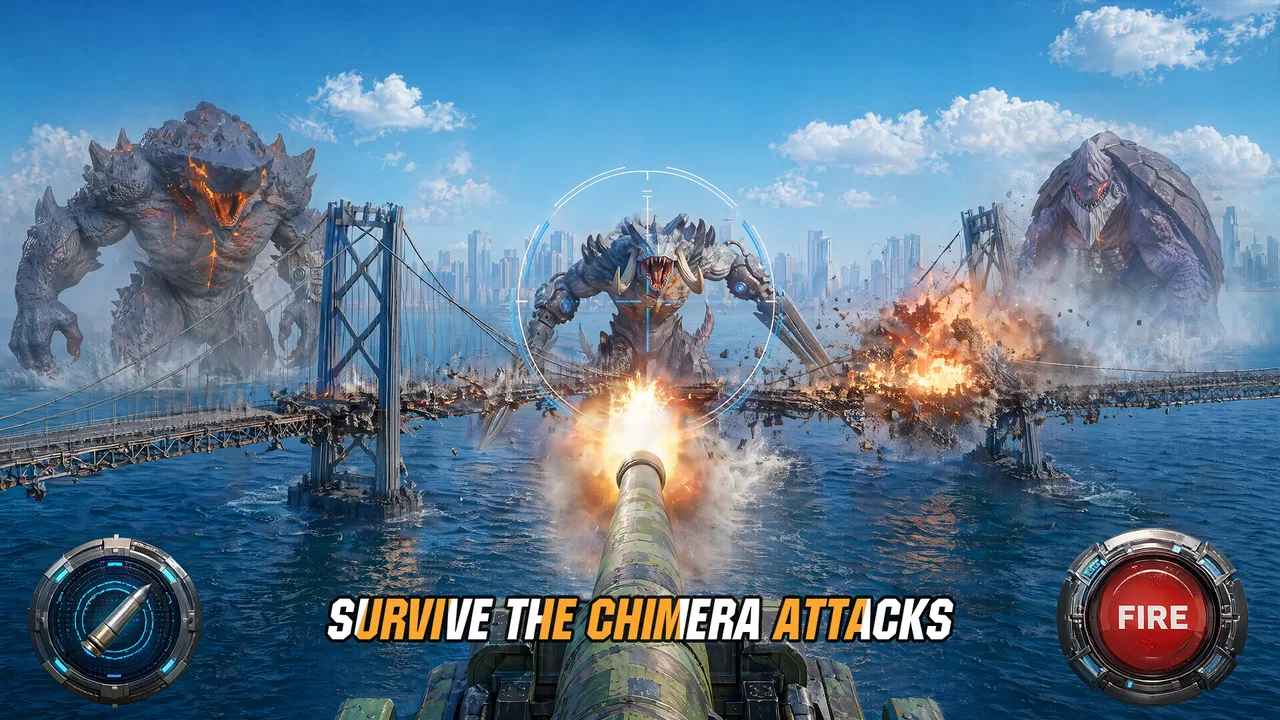
I approached Titan Rush as a strategy game that wants to make a dramatic first impression: the world is recovering from catastrophe, powerful deep-sea Titans are waiting to be reactivated, and commanders are expected to turn scattered forces into something organized. That premise gives the game a clear identity, but it also creates a practical question that matters more than the setting: how much patience does it require before the strategy becomes enjoyable?
My experience is that Titan Rush is most appealing when I treat it as a game of gradual decisions rather than a quick action break. The interesting part is not simply starting a battle. It is learning which choices deserve attention, noticing where progress slows, and building a routine that prevents small mistakes from becoming expensive ones. That makes it a better fit for players who enjoy planning around limited opportunities than for anyone looking for an immediately straightforward arcade game.
It is a free strategy title from RATING GAME, with optional purchases ranging from $0.99 to $199.99 per item. The game is rated Teen, and its broad audience is reflected in its reach: it has passed one million installs and holds a 4.5 average from roughly 9,800 ratings. Those figures suggest a substantial player base, but they do not remove the need to decide whether its pace and spending structure suit you.
You May Also Like

 Blood Strike: 2.5 Anniversary
Blood Strike’s Loadouts Turn Every Drop Into a Tactical Gamble
A close look at Blood Strike’s custom loadouts: how fast access to signature weapons reshapes its battle royale rhythm, rewards preparation, and narrows the gap between fights.

 Pandora - Music & Podcasts
Pandora’s Music Is Easy to Start, but Harder to Recover
Pandora’s strength is its low-effort path from a seed to a station. Its weak spot is how much confidence it asks you to place in connection, setup, and quiet recovery.

 8 Ball Pool
 Is Built on Rivalries, Rematches, and Routine
A close look at the rivalries, rematches, shared routines, and unanswered safety questions that turn a quick pool match into a persistent mobile community.

 Samsung Music
’s Quiet Strength Is Playing What You Already Own
Its reach comes less from spectacle than from dependable access to a personal library. That simplicity is both the app’s strongest retention engine and its ceiling.

 AccuWeather: Weather Radar
AccuWeather Review: A Quick, Clear Forecast for Everyday Decisions
For everyday plans, the best forecast is the one you can understand quickly. AccuWeather makes rain timing, radar, and local conditions easy to act on, with a few trade-offs.

 Hill Climb Racing
Why Hill Climb Racing Still Turns Crashes Into One More Run
A tiny car, a bumpy hill and one more upgrade: Hill Climb Racing keeps resurfacing because its simple chaos makes every near-miss feel personal.
More From Our News Desk



Where the early experience can become confusing
I find the early experience easier to follow when I treat each session as a small planning exercise rather than trying to act on every prompt at once. This section looks at how to set priorities, keep optional spending in perspective, and decide whether the game’s commander-focused pace suits you. From there, it makes sense to check the device and connection basics before settling into a longer session.
The first challenge is building a personal routine
Titan Rush presents a post-apocalyptic command fantasy, yet the practical experience is less about dramatic storytelling and more about managing a sequence of decisions. A new player can easily focus on the most visible objective while overlooking the quieter question of what should be prepared before the next commitment. I found that the game makes more sense once I stopped treating every available action as equally urgent.
That change in mindset is useful because strategy games often punish rushed choices indirectly. A decision may look harmless in isolation, but it can leave fewer options for the next encounter or delay the moment when a stronger force is ready. My advice is to pause at the start of each play session and identify one immediate goal. That goal might be preparing for a difficult confrontation, improving the consistency of your current force, or simply clearing a short task without spending anything.
This is one of the non-obvious strengths of Titan Rush: it rewards attention to sequence. The game feels less stressful when I decide what I am saving for before I begin spending or committing resources. Players who enjoy making a plan and adjusting it will probably settle in faster than players who prefer to tap through every highlighted option.
Why the free model deserves attention
Because the game is free to download, the main practical question is not whether you can begin without paying. You can. The more important question is whether you can enjoy the progression without allowing optional purchases to dictate your decisions. The in-app purchase range reaches as high as $199.99 per item, so I would recommend deciding on a personal spending limit before the game has a chance to turn impatience into a purchase.
I also would not judge the entire experience by the speed of the opening progress. Early advancement can feel generous in many strategy games, while later decisions demand more patience. If you are comfortable with a slower rhythm, free play is easier to evaluate fairly. If your enjoyment depends on unlocking every useful option immediately, the purchase structure may become more noticeable than the strategy itself.
A practical habit helps here: keep a short note of what you are trying to improve and why. If a purchase does not directly support that goal, wait. This prevents the common mistake of buying something merely because it is currently visible. In a game built around commanding Titans and rebuilding strength, restraint is part of the strategy, not an obstacle to it.
Who will understand the appeal quickly
Titan Rush is a good candidate for players who like post-apocalyptic settings but still want a game centered on planning. It should also suit people who enjoy checking in, making a few meaningful choices, and returning later with a clearer objective. The commander theme gives ordinary progression a sense of purpose, even when the actual task is careful preparation rather than spectacle.
I would be more cautious recommending it to someone who wants a self-contained story with a definite ending, a purely reflex-based challenge, or a game that never asks them to think about long-term trade-offs. The Teen rating also makes it a better match for older players and families who are comfortable with that content category. It is not the ideal recommendation for a young child seeking a simple, consequence-free game.
Setup checks that prevent avoidable problems
Before launching, I’d make sure the device meets the relevant system requirement, has breathing room for an update, and is on a steady connection. I’d also avoid starting while several demanding apps are running, since a clean baseline makes any later slowdown easier to interpret. Once those simple checks are done, the next useful skill is recovering your place calmly if play is interrupted.
Start with the basic compatibility check
The current version is 3.25.1, and the game supports devices running Android 7.0 or later. Before troubleshooting anything more complicated, I would check the operating system and make sure the device has enough free space for a normal installation and update. These are simple checks, but they prevent a surprising amount of confusion when an installation stalls or an update behaves differently from the previous version.
I would also use a stable connection during the first launch and any major update. A strategy game that depends on ongoing progression can appear unresponsive when the real problem is an interrupted connection. If the game opens but content does not load correctly, I would first close other network-heavy apps, switch between a reliable Wi-Fi connection and mobile data if available, and then restart the game. That sequence is safer than repeatedly tapping the same screen.
On iOS, the exact system requirement should be checked on the relevant store page before installation, because the confirmed Android requirement does not automatically describe Apple devices. This is a small but important distinction. A reader using an iPhone or iPad should not assume that an Android compatibility statement applies to their device.
Give the first launch time to settle
When a game begins with a large setting and several systems competing for attention, the first session can feel busier than expected. My recommendation is to avoid changing multiple settings or abandoning the launch at the first pause. Let the initial process finish, read the instructions instead of skipping everything, and note the first objective in plain language. That gives you a reference point if the game later seems to have lost your place.
If the game closes during startup, I would take the least destructive steps first: reopen it, restart the device, check for an available game update, and confirm that the operating system is supported. I would avoid clearing stored app data immediately, because that can remove local information and make it harder to tell whether the original issue was temporary. Reinstalling should be a later step, not the first response.
Another useful setup habit is to avoid beginning the first serious session while the device is nearly full or heavily occupied by other demanding apps. I cannot promise that freeing space will solve every problem, but it is a sensible way to remove avoidable pressure before blaming the game. The goal is to create a clean baseline so that later troubleshooting has a clear starting point.
Do not confuse a delayed screen with a lost decision
Strategy games encourage rapid input when a button appears to do nothing. That can create duplicate actions or leave the player unsure what happened. If Titan Rush seems slow after a tap, I would wait briefly, check whether the screen has changed, and avoid pressing the same control repeatedly. This is especially important around actions that may alter your current plan or consume something valuable.
I also recommend taking a screenshot or writing down the last visible objective before closing the game when something looks wrong. A simple record of the screen, the action you selected, and what happened afterward is more useful than a vague memory of “it stopped working.” It can also help you decide whether the issue is repeatable or was only a temporary connection delay.
Recovering a disrupted workflow without making it worse
If a session closes unexpectedly, I’d first reopen the game and inspect the current objective instead of repeating the last action from memory. A brief note about what I intended to do can help preserve the plan without turning troubleshooting into guesswork. With the immediate workflow restored, it is worth considering whether the cause was actually inside the game.
Return to the smallest unfinished step
When a session is interrupted, I do not try to reconstruct the entire plan at once. I reopen the game, identify the last clearly completed action, and continue from the smallest unfinished step. This approach works particularly well for Titan Rush because the commander fantasy encourages long-term thinking, but a disrupted session is usually solved by a short-term check.
For example, if I had prepared for a confrontation but the game closed before I knew whether the action registered, I would first inspect the current state rather than immediately repeating the preparation. Repeating an action without checking can waste time or create a different problem. The safer workflow is to compare the current objective, available options, and visible progression with what I remember from the previous session.
This is also where a personal play log becomes surprisingly useful. I do not mean a detailed diary. A few words such as “save for next upgrade” or “check result after reconnecting” are enough. That note protects the original strategy from being replaced by a rushed reaction, which is one of the easiest ways to lose direction in a progression-focused game.
Separate a game-state issue from a display issue
If an action appears not to have worked, I look for more than one sign before deciding that the game failed. Has the objective changed? Did the available choice disappear? Is the next screen different? Has the game returned to the same position after reopening? These observations help distinguish a visual delay from a genuine interruption.
When the result remains unclear, I would close and reopen the game once, then repeat the check. I would not keep restarting in a loop, because repeated interruptions can make a temporary connection problem look like data loss. If the same issue continues, recording the device type, operating system, game version, and exact sequence of actions gives support staff something actionable rather than a general complaint.
The version number is worth including when asking for help because the game is actively identified by version 3.25.1. That does not guarantee a quick solution, but it removes one layer of ambiguity. I would also mention whether the problem happened on Wi-Fi or mobile data and whether it appeared after an update, since those details can point toward different causes.
Protect the strategy from impulsive recovery
A disrupted workflow often makes players spend more aggressively because they want to return to the previous position immediately. I think that is the wrong recovery method. If progress feels uncertain, pause purchases and major commitments until the game state is clear. This is particularly important in a free game with optional items priced from $0.99 up to $199.99, where frustration can make a temporary problem feel financially urgent.
Instead, use the interruption as a reason to simplify the next session. Choose one objective, avoid experimenting with several changes at once, and confirm the result after each meaningful action. This makes the game easier to understand and gives you a better chance of identifying whether the original trouble was caused by the connection, the device, or your own sequence of inputs.
When Titan Rush may not be the cause
A delayed response can come from a connection, device load, or background activity, so I would change one condition at a time before deciding the game itself is at fault. If the same trouble persists, recording the steps that led to it is more useful than repeatedly reinstalling or clearing information. That distinction also helps decide whether Titan Rush is the right style of strategy game for you.
Connection and device conditions matter
Not every failed load, frozen screen, or delayed response is a game defect. A weak connection, aggressive battery saving, limited storage, background downloads, or a device under heavy load can all create symptoms that look similar from the player’s side. I would test the game after closing unnecessary apps and using a stable network before deciding that the installation itself is broken.
It is also worth comparing behavior across situations without changing too many variables. If the game works on one connection but not another, the network deserves attention. If it works after a device restart but becomes unreliable later, background activity or heat may be involved. If only one particular action causes trouble, the issue may be tied to that workflow rather than the whole game.
These checks are not glamorous, but they are useful because they prevent destructive troubleshooting. Clearing data or reinstalling can remove local progress or reset preferences, while a connection change might have solved the issue more safely. I prefer the least invasive fix first, especially in a game where the player is building progress over time.
Know when another strategy game is a better fit
Titan Rush has a specific appeal: it combines a ruined-world command theme with the fantasy of bringing deep-sea Titans back into action. That is more distinctive than a completely neutral strategy setting, but it also means the game may not satisfy every strategy fan. If you want a pure puzzle experience, a traditional board-game adaptation may offer cleaner rules and fewer progression distractions. If you want rapid battles with almost no preparation, an action strategy game may be a better match.
Likewise, players who dislike optional purchases should consider whether the free structure will distract them. The game can still be approached cautiously, but the presence of high-priced individual items means the spending question is part of the experience. I would choose a different title if my main requirement were a strategy game with no purchase prompts or no pressure to think about long-term progression.
On the other hand, people who enjoy returning to a developing world, making measured decisions, and imagining themselves as the commander of an unusual force may find the theme more memorable than the usual fantasy or military alternatives. The deep-sea Titan idea gives the game a useful hook, provided you are willing to engage with its slower planning rhythm.
A practical verdict for everyday play
For everyday play, I’d recommend approaching Titan Rush with one modest goal per visit and a clear boundary around optional purchases. Its post-apocalyptic commander theme and deep-sea Titans give it a distinctive mood, while its deliberate planning will not suit everyone. The closing question is less whether it is broadly appealing than whether this particular rhythm feels rewarding to you.
A realistic session pattern
Imagine having ten or fifteen minutes during a commute or after work. I would open Titan Rush with one clear intention rather than trying to complete everything available. First, I would check the current objective and confirm that the connection is stable. Then I would decide whether the session is for preparation, a confrontation, or reviewing progress. Finally, I would stop after the intended task instead of spending simply because another option is visible.
That routine makes the game feel more controlled. It also helps answer a question many players have after installation: can it fit into ordinary life? In my view, yes, if you enjoy compact planning sessions and do not need every visit to produce a dramatic event. It becomes less comfortable when you expect constant action or when interruptions make you anxious about losing momentum.
What I would tell a friend before recommending it
I would tell a friend to try Titan Rush for its setting and strategic pacing, but to approach the first session as orientation rather than a race. Pay attention to how the game presents objectives, keep track of the decision you are saving toward, and do not treat every optional purchase as part of normal progress. Those habits reveal the game’s real strengths without allowing the monetization or early confusion to dominate the judgment.
I would also mention the Teen rating before recommending it to a family, and I would check device compatibility before promising that it will run smoothly. Android users need version 7.0 or later, while Apple users should verify the requirement for their particular device. The developer is RATING GAME, and the current release is 3.25.1, so keeping the installation updated is a sensible part of a clean setup.
My final opinion is positive but measured. Titan Rush has a strong central fantasy and enough strategic structure to reward thoughtful players, especially those who like rebuilding power instead of receiving it instantly. Its weak points are the potential for early workflow confusion, the need for patient recovery when a session is interrupted, and a purchase range that deserves deliberate boundaries. Try it if you want a commander-focused strategy game with a distinctive Titan theme; skip it if you want instant action, a fixed story, or a completely purchase-free experience.
FAQs for Titan Rush
01What is Titan Rush and what can I expect from the gameplay?
Titan Rush is an action-packed RPG that immerses players in a world where they must battle colossal titans. The game offers a blend of strategic combat and character development. Players can expect to engage in dynamic battles, upgrade their heroes, and explore various environments. The gameplay is designed to be both challenging and rewarding, with a strong emphasis on skill and strategy.
02Is Titan Rush free to play, or are there in-app purchases?
Titan Rush is free to download and play, but it does offer in-app purchases. These purchases can enhance your gaming experience by providing access to exclusive items, character upgrades, and faster progression. However, all features necessary to enjoy the game are accessible without spending money, allowing players to enjoy the core experience for free.
03What devices are compatible with Titan Rush?
Titan Rush is available on both Android and iOS platforms. It requires a device running on Android 5.0 or later, or iOS 11.0 or later. For the best experience, it's recommended to play on devices with at least 2GB of RAM. Ensure your device is updated to the latest version to avoid compatibility issues.
04Does Titan Rush require an internet connection to play?
Titan Rush requires an internet connection for most of its features, including multiplayer modes and syncing progress. However, some single-player content may be accessible offline. To fully enjoy all the social and competitive aspects of the game, maintaining a stable internet connection is recommended.
05How does the multiplayer mode in Titan Rush work?
The multiplayer mode in Titan Rush allows players to team up with friends or compete against others in real-time battles. You can join guilds, participate in cooperative missions, and engage in player-versus-player arenas. The game fosters a vibrant community, enabling players to collaborate and strategize together for a more enriching experience.
Pros
- Engaging storyline keeps players hooked.
- Stunning graphics enhance gameplay experience.
- Variety of weapons and upgrades available.
- Smooth controls for seamless navigation.
- Frequent updates with new content.
Cons
- Requires a stable internet connection.
- Can be resource-heavy on older devices.
- In-app purchases can be pricey.
- Some levels can feel repetitive.
- Occasional bugs in multiplayer mode.

Titan Rush
Gallery